- Meta Business
Create. Post. Get found. Manage it all.
Beaquaro is where creators make, post and grow, where brands find them, and where agencies manage them.
Beaquaro Studio
Write in your own voice, post to every platform in one go, turn comments into DMs, and see what works.
10 platforms · 10 languages · Nothing posts twice
maya.cooks
Reel
mia guide please
Sent! Check your DMs.
Direct message
Here is the guide you asked for.
Open the guide
Example with made-up content
- 0
- platforms from one place
- 0
- languages
- 0
- ways to reach people: posts, replies and DMs
- 0
- calendar for everything you post
Everything a creator does after hitting record
Write it, post it everywhere, answer the people who respond, and learn what to make next.
Comments to DMs
Every “link please” gets answered, once
Someone comments your keyword on a reel. They get a public reply and a private message with your link, in your words, within seconds. Nobody is messaged twice, and a message that fails is retried, not lost.
- A reply under the comment, then the direct message
- Ask people to follow you first (Pro)
- Every message is one you wrote or approved
maya.cooks
Reel
Mmia guide please
Sent! Check your DMs.
Direct message
Here is the guide you asked for.
Open the guide
Example with made-up content
Write in your voice
Captions that sound like you wrote them
Give it an idea. Studio drafts the caption in your own style and tailors it to each platform. You pick one of three options and change any word before it goes out.
- Different wording per platform when you want it
- Your voice, learned from your own posts
- Nothing invented about you or your work
Your idea
Three habits I wish I had started sooner
Written in your voice
Three habits I wish I’d started sooner.The second one changed my mornings.Which one will you try first?Scheduled for Thu 9:00
Example with made-up content
Schedule everywhere
A week of posts, planned in one sitting
Plan across platforms on one calendar. Search it, filter it, move a post, and let Beaquaro send each one when it is due. If one cannot go, you are told why in plain words, and your scheduled posts survive a reconnect.
- Instagram, Facebook, YouTube, TikTok and six more
- Posts go out once, on time
- Failures explained, never a wall of codes
This week
- MonReel: 3 habitsPosted
- TueShort: my dayPosted
- WedThread on toolsToday 9:00
- ThuArticle teaserScheduled
- FriPin: recipeScheduled
If a post cannot go out, you are told why in plain words.
Example with made-up content
See what works
Know what to make next
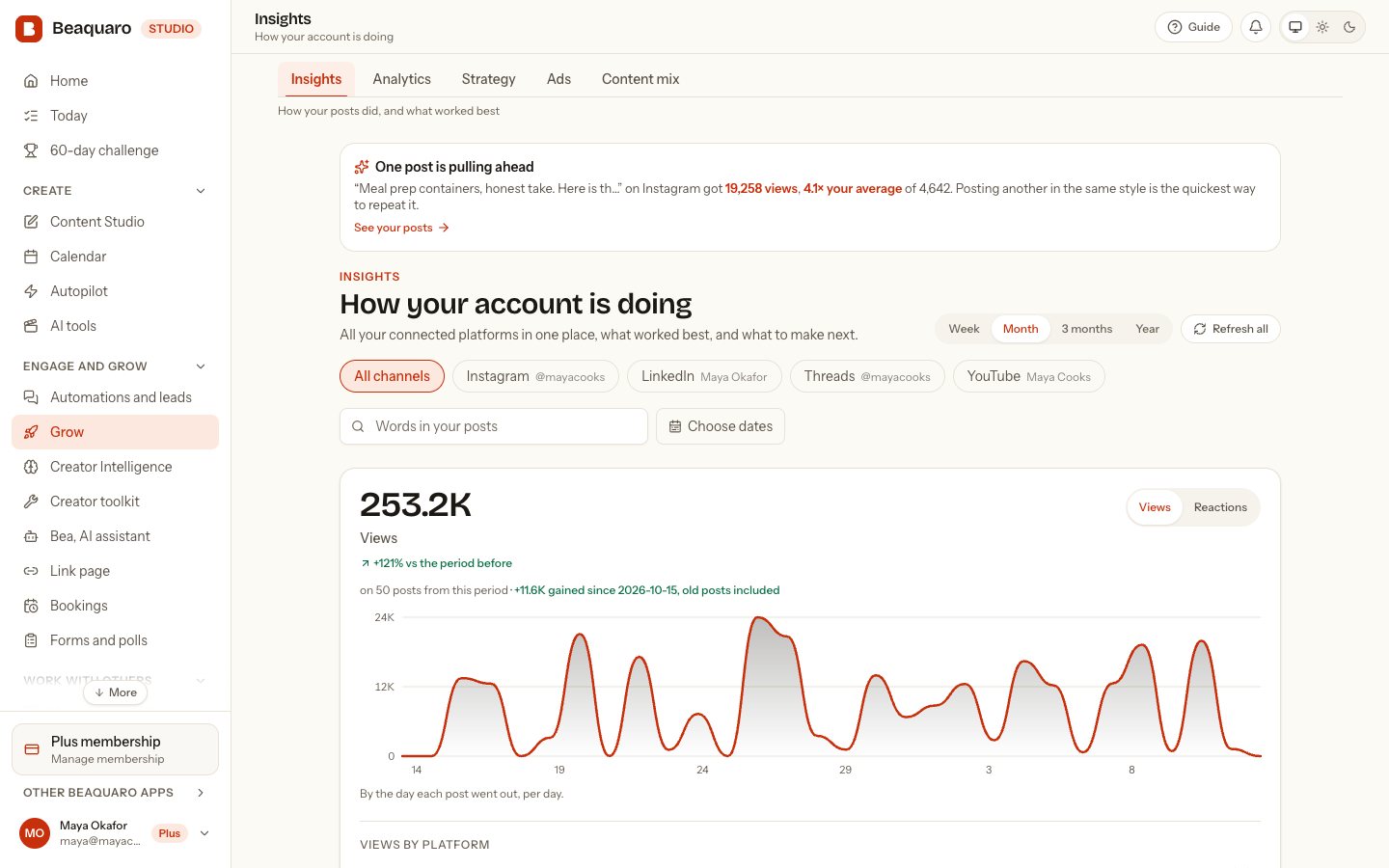
Views and followers from every connected account in one view. Filter by channel, search the words in your posts, or pick your own dates. Where a platform does not share a number, Beaquaro says so instead of guessing.
- Compare channels side by side
- Find your best posts by what you said
- Numbers come straight from your accounts
Views this month
Instagram82%YouTube64%Threads41%Bluesky28%Best post this month
“Three habits I wish I’d started sooner”Where a platform does not share a number, Beaquaro says so.
Example with made-up content
maya.cooks
Reel
mia guide please
Sent! Check your DMs.
Direct message
Here is the guide you asked for.
Open the guide
Example with made-up content
Built to be dependable
Your audience is your reputation. Beaquaro treats it that way.
A post goes out once
Scheduled, retried or delivered twice by a platform, it is still one post. Never none, never two.
A message is sent once
The same comment never gets the same DM again, and a message that fails is retried until it lands.
You are told why
When something cannot go out you see a plain reason and what to do, not a code. Your scheduled posts survive a reconnect.
Your login stays with the platform
You sign in on Instagram, YouTube, TikTok and the rest, on their own pages. Beaquaro never sees your passwords.
Where your audience already is
Connect an account by signing in on the platform’s own page. Beaquaro never sees your passwords.
- InstagramPhotos, reels and stories, and comment-to-DM automations
- FacebookPosts to the Pages you manage
- YouTubeShorts and videos, on the channel you choose
- TikTokVideos to your inbox as a draft, or straight to your profile
- LinkedInText, photos and video to your profile
- ThreadsText, photos and video, with a topic
- PinterestPhotos and videos as pins to your board
- XText, photos and video
- BlueskyText, images and video
- TelegramText, photos and video to your channel, through a bot you make
What changes in your week
Before
Doing it all by hand
- Posting the same thing five times, five ways
- Copy-pasting the same reply under every comment
- Leads lost in a pile of messages
- No idea which post actually worked
With Beaquaro
Doing it once
- Write once, post everywhere, on time
- Comments answered and links sent for you
- Every message in your own voice
- One view of what worked
From sign-up to your first automated reply
Most people are set up in one sitting.
- 1
Create your account
The free plan is enough to post and try the tools. No card.
- 2
Connect your accounts
Sign in on each platform’s own page. Disconnect any time without losing your posts.
- 3
Write, schedule, automate
Draft a caption, plan the week, and set your first comment-to-DM.
One place to create, post and follow up
The three things that take most of a creator’s week, done in one workspace.
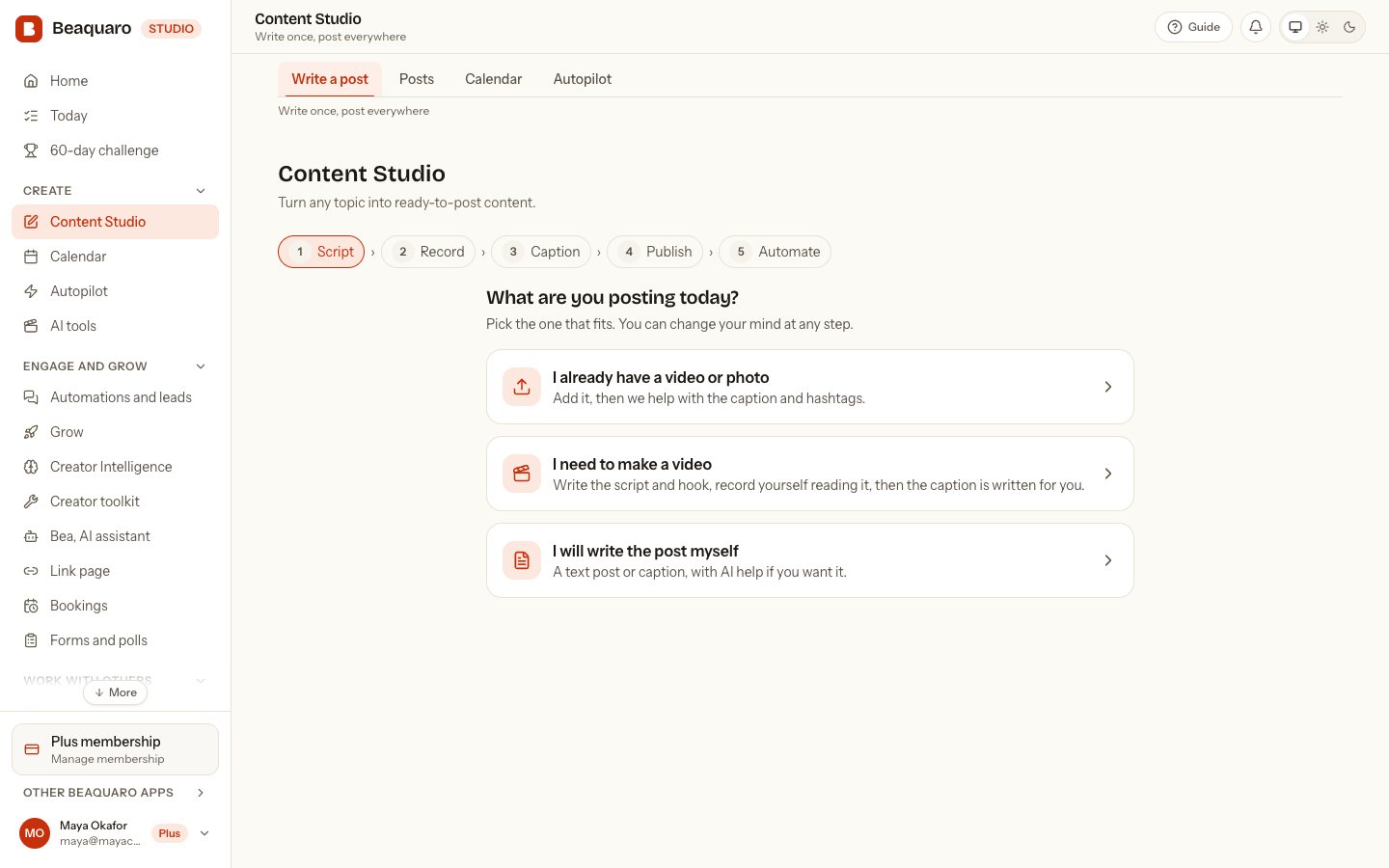
Write once, post everywhere
Turn an idea into a script, a caption and a post for every platform you use, in your own voice.
- Captions that sound like you, and you approve every one
- Post to your connected platforms at once, or schedule for later
- Trim, caption and polish video in the built-in editor
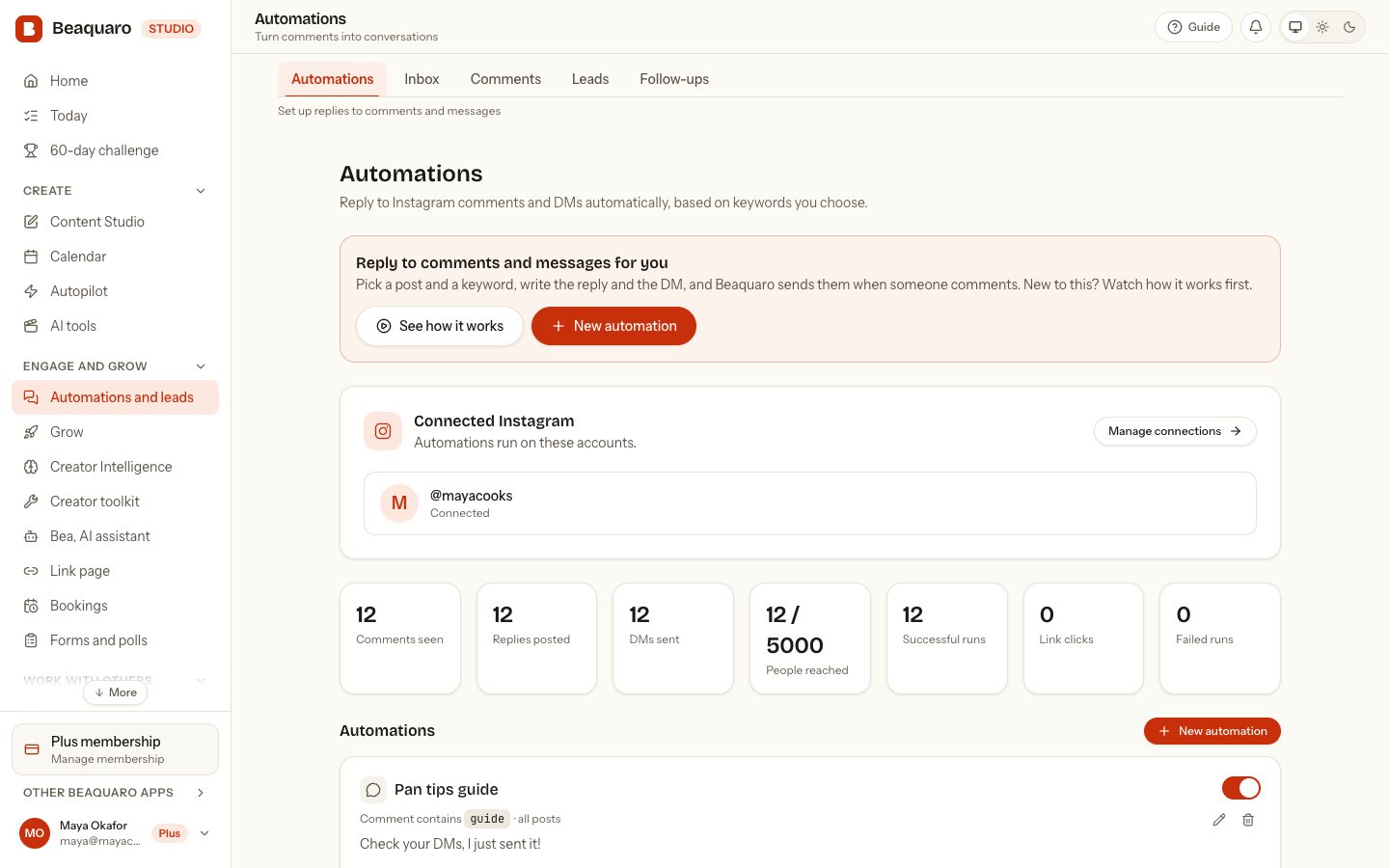
Turn comments into customers
When someone comments your keyword, Beaquaro replies under their comment and sends your link in a DM.
- You write every word, with AI suggestions if you want them
- Optionally ask people to follow you first (Pro)
- Built-in limits so your account stays safe: an hourly cap, a cooldown per person and no duplicates
See what works, then do more of it
Every platform in one view, with your best posts, the best time to post and a plan built from your own numbers.
- Filter by channel, date range and words in your posts
- One post pulling ahead? It tells you, and what to repeat
- Your numbers stay yours: nothing is guessed or promised
We never see your passwords
You sign in on each platform’s own page. Beaquaro only gets the permissions you approve there, and you can disconnect any time.
Limits that protect your accounts
An hourly send cap, a cooldown per person and no duplicate sends. Automations only reply to people who comment or message you first.
You stay in control
You write or approve every message. Nothing goes out unless you set it up, and you can pause any automation with one tap.
More about BeaquaroThe 60-day challenge, link page, agencies, automations, the AI assistant, safety, and how it compares.
What are you after?
Pick the one you came for.
Step
- 01CreateYou want to make better posts, faster.Write in your own voice, polish the opening line, add a photo or video, and edit the video right in your phone or browser.See how you create
- 02PostYou want it everywhere without doing it five times.One button sends it to every platform you have connected, now or at the time you pick. Comments can become DMs. Nothing goes out until you say so.See where it posts
- 03Get foundYou want brands and new people to find you.Brands on Beaquaro Business find creators by their real results. You stay hidden until you decide to be seen, and can hide again any time.See how brands find you
60-day growth challenge
60 days. A post every day. Your money back if it does not show.
A proper programme for creators on a monthly plan, planned the way a social media manager would, and judged against your own numbers.
Day 0: we measure where you start
Fill in your Brand profile, write your bio and connect your account. We read how fast it was already growing, because that differs from one person to the next.
Then a post every day, with real video
Day 1 starts with making content from your Brand profile. Every day tells you what to make: a hook, three beats and the camera angle. Reel check reads each video first, and you publish through Beaquaro: a post on each of the 60 days: 45 reels and 15 posts.
Your money back if it does not show
Do the work and, if none of your connected accounts grew against your own pace, we refund what you paid. If even one grows, there is no refund. No promised follower count, because nobody can promise one.
Studio + Business
One network: creators grow in Studio, brands find them in Business.
The two products share one loop. What a creator proves in Studio is what a business can discover, and a creator is never contacted without saying yes.
Beaquaro Studio · for creators
Create, publish, answer, and get found
- Writes in your voice and posts to five platforms
- Turns comments into DMs while you sleep
- Shows brands your real performance, only if you choose
Beaquaro Business · for brands
Find creators who perform where you advertise
- Describe the campaign and pick your platforms
- Creators ranked by Campaign Fit, with the reasons shown
- Shortlist, compare, and ask: the creator answers
1 · Studio
A creator opts in
In Beaquaro Studio a creator chooses to be discoverable (the other two choices keep them out of search entirely). Their real results per platform (engagement, average views, posting rhythm) become visible. Email, phone, drafts and connections never do.
2 · Business
A business describes the campaign
In Beaquaro Business a company says what it wants and which platforms matter. Beaquaro ranks creators by how they perform on those platforms, not by follower count.
3 · Business
The business asks
It picks a creator and sends a collaboration request with the platforms, deliverables, budget and a personal message.
4 · Studio
The creator decides
The request lands in the creator’s Studio dashboard. They accept or decline. Contact details are shared only after they accept, and only if they allow it.
The creator pool is small and grows as creators choose to join. Nothing is shown to a business unless the creator turns it on.
One link in your bio for who you are, your work and your time.
Put a single address in your Instagram, TikTok or YouTube bio. People see your profile and links, look through your portfolio, and book a video call with you, all without leaving it. It is free to start.
- One link for your bioYour name, a short intro and every link that matters, with a click count on each.
- A portfolio you can sharePhotos, videos and links in a clean page. Pick Blush, Studio or Noir and change it any time.
- Let people book youSet your hours once. People choose a time in their own time zone, and you both get an email and a calendar file.
- Video calls built inEvery booking gets a private video room. Guests sign up free to join, so you know who is in the call. Invite people to a meeting by email too.
- Yours to shareA short address and a QR code. It is hidden until you switch it on, and search engines only list it if you say so.
Maya Rivers
Lifestyle and beauty creator
Honest product stories and weekly routines. Brands, say hello below.
Powered byBeaquaro
An example page. Yours can look like this, or you can pick another style.
Blush
Studio
Noir
Three portfolio styles
Manage creators for a living?
Run all of your creators from one place. Try your first 5 creators for 7 days. After that it is $4 a creator for the first 2 months, then $8 a creator a month, and less as your roster grows.
- One rosterInvite creators in bulk, 10 or 1,000. Stages, tags and private notes for each.
- Written in each creator’s voiceScripts, hooks and posts that sound like the creator, not like you.
- An approval step for everythingCreators choose what you may do. Nothing goes out without their tap.
- platforms from one post
- 0
- languages to write in
- 0
- click to publish to all
- 0
- card needed to start on the free plan
- Free
Product
Write, plan, publish and learn — in one workspace instead of a patched-together stack.
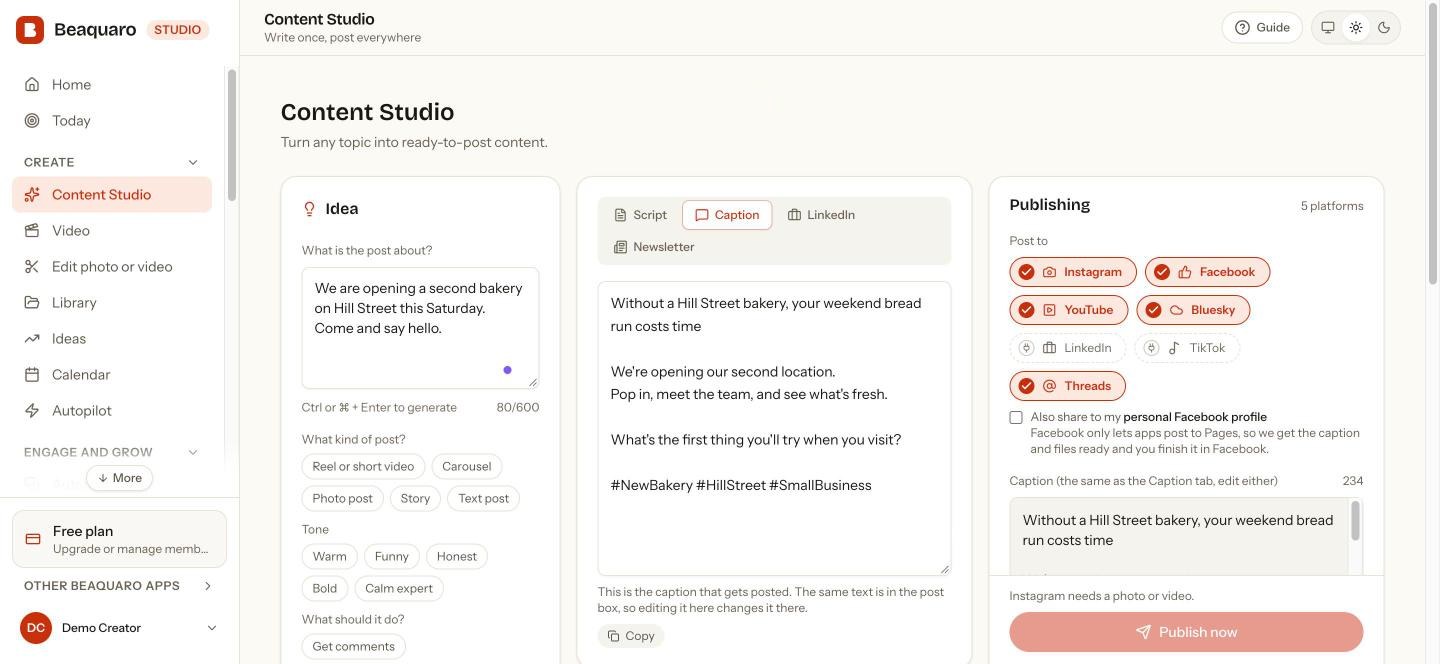
Write
Writes like you. Every time.
Set your style, audience and tone once. Scripts, captions and hashtags start from there — and you approve every word before it goes anywhere.
- Scripts, captions and hashtags from one idea
- Remembers your style, audience and tone
- Nothing is published without your say-so
Plan
See the whole week at a glance.
Drop posts onto a calendar and set a time. Every platform lives in one view, with a clear status on every post.
- Weekly autopilot drafts your next posts for approval
- Files are deleted from storage as soon as they are posted
- Know what is live, queued or waiting on you
Weekly tip thread
Behind the scenes
Tutorial: batching
Q&A recap
Feature launch
Launch announcement
Customer story
Weekend reading
Week in review
Publish
Post once. It goes everywhere.
Photos, reels and stories to Instagram, posts to Facebook, videos to YouTube, text to Bluesky. All from one place, at the time you choose.
- Instagram posts, reels, stories and trial reels
- YouTube, Bluesky and Facebook from the same calendar
- Big 4K videos are shrunk to 1080p in your browser first
- Published
YouTube
Uploaded and live
- Published
Bluesky
Posted
- Copy & post
Instagram
Caption and media ready
- Copy & post
Facebook
Caption and media ready
Connect
Connect once. Stay in control.
Sign in with each platform’s own login. See what is connected and what each connection can do — nothing is hidden.
- Your passwords never reach us
- Disconnect any platform at any time
- Clear notes on what each platform allows
- Connected
YouTube
Stats and video uploads
- Connected
Bluesky
Stats and posting
- Connected
Instagram
Stats, posts, reels and stories
- Soon
TikTok
On the roadmap
Learn
Insight that becomes the next post.
Beaquaro reads your real post history, works out your niche and turns what performs into a short, specific growth plan.
- Followers, views and posts across platforms
- Niche detected from what you actually post
- A short plan, not a wall of numbers
Followers
Per platform
from your account
Views
Per post
where available
Posts
Published
and scheduled
Your growth plan
- 1Repeat the formats your own audience engages with most.
- 2Post at the times your own results show work best.
- 3Turn a strong video into posts for your other platforms.
Illustration only. Your own real numbers appear here once you connect an account.
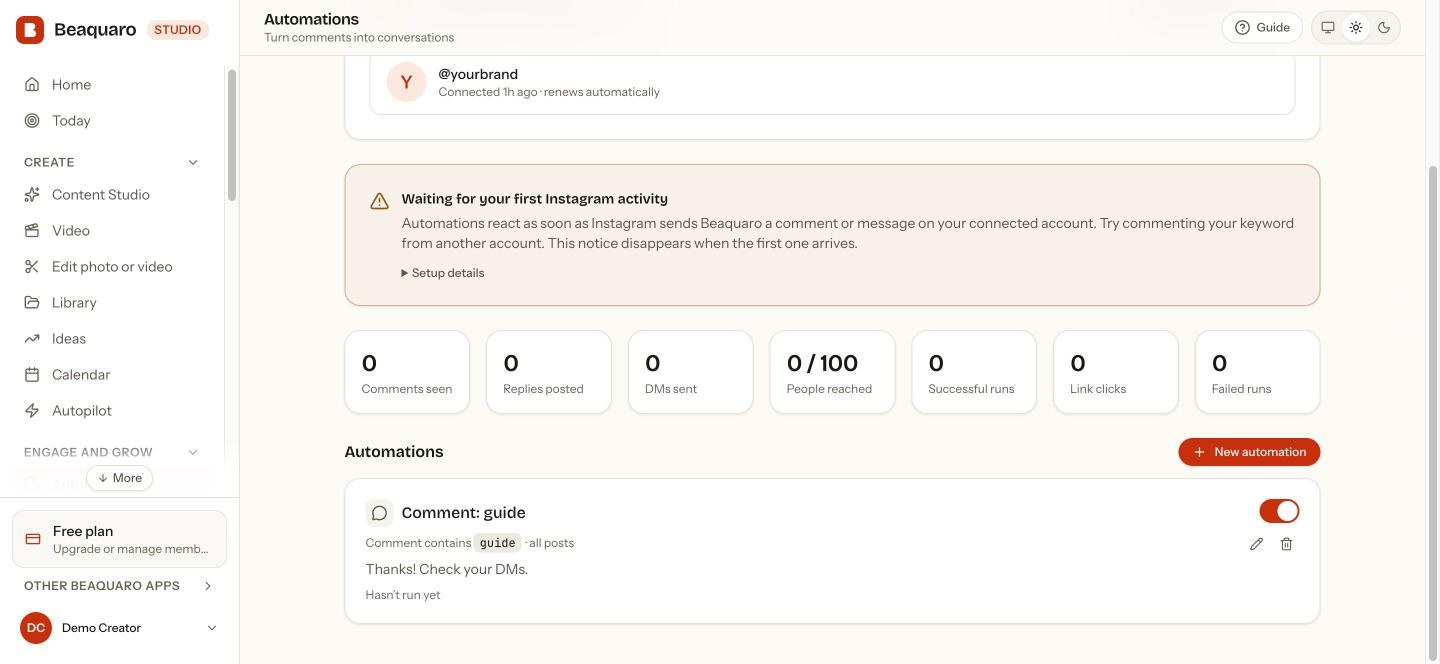
Instagram automations
Turn comments into conversations — automatically.
Pick a keyword. When someone comments or messages it, Beaquaro replies publicly and follows up in their DMs with the link or answer you wrote. It runs around the clock, right next to your content calendar.
- Comment and DM keyword triggers, with as many keywords as you like
- Optional “send me the link” button before the DM goes out
- Apply to every post, or just one reel
- Activity log showing every comment seen and message sent
Start free. No card needed
Step 1
Someone comments your keyword
A follower writes “GUIDE” or “PRICE” on a post or reel — or sends it as a message.
Step 2
Beaquaro matches it instantly
You choose the keywords and which posts they apply to. Matching happens the moment Instagram tells us.
Step 3
A reply and a DM go out
A short public reply under the comment, then the private message you wrote, with your link or answer.
Account-safe by default
Hourly send caps and a per-person cooldown keep your account well inside Instagram’s limits.
Your login stays with Instagram
You sign in on Instagram itself. We never see your password, and tokens are stored encrypted.
You write every word
Replies are the exact messages you set up. Nothing is generated or sent that you haven’t written.
You sign in on Instagram itself, and you can disconnect any time, which deletes your automations and message history. Read our Privacy Policy and the data deletion page.
Use it from your AI assistant
Already chat with Claude or ChatGPT? Run Beaquaro from there.
Connect once, then ask in plain words. It works with the AI subscription you already have. Included from Creator Lite; posting from your assistant starts at Plus.
Copy the address
It is the same for everyone. It contains no password and nothing private.
Add it in your assistant
Claude: Settings, Connectors, Add custom connector, paste. ChatGPT: Settings, Connectors (developer mode), create, paste. Whether your plan offers custom connectors is up to Claude or ChatGPT.
Sign in and press Allow
You sign in on Beaquaro itself. The Allow screen shows who is asking and where it sends you back to. Posting is off unless you tick it.
You need a Beaquaro account to finish step 3. Create one free or read the full guide .
Things you can ask
- What worked best on Instagram this month?
- Draft three posts about Friday’s launch in my voice.
- Schedule the second one for 9am tomorrow.
- Pause the “guide” comment automation.
What it can do
- Read your account, posts and analytics
- Learn your writing style from your own captions
- Draft posts for you to approve
- Schedule or publish, only if you allow it
- Set up and pause comment-to-DM automations, only if you allow it
How you stay in control
Your password stays with Beaquaro
You sign in on Beaquaro’s own page. Claude and ChatGPT never see your password.
Look-only unless you say otherwise
On the Allow screen, “posting and changes” starts switched off. Leave it off and the assistant can only read.
It is told to ask first
Beaquaro tells the assistant to show you the exact post, platforms and time and wait for your yes. Assistants can still make mistakes, so read it before you agree.
Take it back any time
Remove any assistant in Studio under Profile and connections, then AI assistants. Comments and captions are treated as information, never as orders.
Never paste a Beaquaro token into a chat. Connectors use the sign-in above. Personal tokens are only for developer tools and are made in Studio.
Trust
You never give us your social media password.
You connect each account through its own official login. Your Beaquaro password is hashed, so even we cannot see it. Here is exactly what that means.
We never ask for your social passwords
You sign in to Instagram, Facebook, YouTube and X on their own page, not ours. Bluesky uses an app password you can revoke any time, never your main one.
Your Beaquaro password is hashed
It is scrambled with a salted one-way hash (bcrypt) the moment you set it. Nobody at Beaquaro can read it, and we could not show it to you if we tried.
Connections are encrypted and yours to remove
The tokens that let Beaquaro act for you are encrypted before they are stored. Disconnect an account, or delete everything, whenever you like.
Nothing is posted or sent without your say-so, and your uploads are deleted after publishing. Read the full security page
Account safety
How we keep your accounts from being limited or banned.
No tool can promise a platform will never restrict an account. Restrictions mostly come from spam-like behaviour and unofficial access, so Beaquaro is built to do neither.
Official connections only
Beaquaro posts and replies through each platform’s own official connection, the one you approve on their page. It never logs in as you, scrapes, or uses unofficial tricks, which is what gets accounts flagged.
Automations are paced, not blasted
Comment-to-DM sends are capped at 200 an hour per Instagram account, pause 5 minutes per person by default, can reach each person once, and can stay inside the hours you choose. Anything over the cap waits in line and goes out later; nothing is dropped.
We back off when a platform says slow down
If Facebook or Instagram says “too many requests”, Beaquaro stops asking, waits 5, 15, 30, then 60 minutes if it keeps happening, puts any due posts back in line, and tells you in plain words.
No double posting
A scheduled post is claimed before it is sent, so two runs can’t send it twice. The same post sent again within 10 minutes is skipped. If we can’t confirm a send, we never repeat it by ourselves; we ask you to check first.
Each platform has its own rules, and you stay responsible for what you post. Read the security page
Why Beaquaro
Other tools post for you. Beaquaro also sounds like you, and answers your comments.
Most creators stitch together a scheduler, an automation tool and an AI chat. Beaquaro does the three jobs that actually fill your week in one place.
1 · Your voice
It writes like you, not like AI.
Beaquaro learns from your own captions, then drafts in that style. Other tools hand everyone the same polished, generic tone.
Unlock the power of consistency with these 5 game-changing tips! 🚀
ok so I batched a whole week of reels in one sitting and honestly never going back
Example of the difference
2 · Your comments
Comments turn into DMs while you sleep.
Someone comments your keyword. Beaquaro replies under the comment and sends your link in a DM. Schedulers stop at posting; this is where the leads leak.
guide please 🙌
Sent it to your DMs! 📩
Here's the guide you asked for: beaquaro.link/guide
Example automation
3 · Your assistant
Run it from Claude or ChatGPT.
Add Beaquaro as a connector and just ask. Your assistant drafts, schedules and reads your analytics, and always asks before it posts.
Schedule three posts about Friday's launch
Drafted 3 in your style for Fri, Sat, Sun. Post them?
Yes, post them
Example conversation
How it compares
Beaquaro next to the tools you would use today
An honest side by side. Where another kind of tool is stronger, we say so.
Learns your writing style from your captions
- Beaquaro
- Yes
- Schedulers
- Usually generic AI prompts
- Automation tools
- No
- AI caption tools
- You re-explain it every time
Schedules and publishes to several platforms
- Beaquaro
- Yes
- Schedulers
- Yes
- Automation tools
- No
- AI caption tools
- Varies
Comment-to-DM automation
- Beaquaro
- Yes
- Schedulers
- Rarely
- Automation tools
- Yes, in depth
- AI caption tools
- No
Writing, posting and replies in one tool
- Beaquaro
- Yes
- Schedulers
- No
- Automation tools
- No
- AI caption tools
- No
See every platform’s numbers with what to do next
- Beaquaro
- Yes, from week to year
- Schedulers
- Charts, varies by plan
- Automation tools
- Not the focus
- AI caption tools
- No
Run it from Claude or ChatGPT
- Beaquaro
- Yes
- Schedulers
- Rarely
- Automation tools
- Rarely
- AI caption tools
- Drafting only
Bring your own AI model
- Beaquaro
- Yes
- Schedulers
- Usually not
- Automation tools
- No
- AI caption tools
- Not applicable
Free to start
- Beaquaro
- Free plan, paid plans for more
- Schedulers
- Limited free plans
- Automation tools
- Free tier
- AI caption tools
- Varies
Where it is strongest
- Beaquaro
- Solo creators who sell through Instagram
- Schedulers
- Teams, reports, many networks
- Automation tools
- Complex chat funnels
- AI caption tools
- Visuals and quick ideas
Where the others win: Hootsuite and similar tools lead on team approvals, social listening and big-company reporting. ManyChat leads on multi-step chat funnels. Canva leads on design. Beaquaro is built for one creator who wants to write, post and reply in one place.
Based on public information and typical plans in October 2026. Products change, so check each one's current features.
How it works
Connect your accounts
Sign in with each platform’s own login. We never see or store your passwords.
Set your style once
Pick your tone and audience. Every draft starts from there.
Write, schedule, relax
Draft with AI, pick a time, and Beaquaro handles the publishing and the handoffs.
Platform support
No vague promises. Here is what Beaquaro can and can’t do on each platform right now.
- YouTubeStats:YesAutomaticUpload videos directly
- BlueskyStats:YesAutomaticText, images and video
- InstagramStats:YesAutomaticPosts, reels and stories · comment & DM automations
- FacebookStats:YesAutomaticPosts to your Facebook Pages
- LinkedInStats:—AutomaticText, photos and video
- TikTokStats:—AutomaticSent to your inbox as a draft
- ThreadsStats:—AutomaticText, photos and video
- XStats:—AutomaticText, photos and video
- PinterestStats:—AutomaticPhotos and videos as pins; pins stay private until Pinterest approves Beaquaro
- TelegramStats:—AutomaticText, photos and video to your channel, through a bot you make
Pricing
Pick the plan that fits how you create
Monthly prices are below, and yearly is two months free. Lite is the low-cost way in: one small payment a year.
Lite
$29.99/year
about $2.50 a month, billed once a year
Everything you need to start growing as a creator. Create content, build your profile, understand your audience and manage collaborations without expensive subscriptions.
Get LitePlus
$6.99/month
or $68.99 a year, two months free
For creators who have outgrown Free and post on a few more platforms.
Get PlusPro
$13.99/month
or $138.99 a year, two months free
For creators who post every week, with Autopilot and follow-up funnels.
Get ProAgency
Talk to us
Up to 10 accounts
For agencies and heavy use: up to 10 accounts, far more posts, automations, AI and storage. Arranged by talking to us.
Talk to salesJust looking around? Start free, no card needed.
Compare every plan and what each includesFAQ
You sign in on Instagram itself, so your password never reaches us, and you choose what to allow. Automations only answer people who comment or message you first, with an hourly send cap, a cooldown per person and no duplicate sends. You can switch any automation off instantly, or disconnect and we delete its automations and message history.